
TemptShield for Chrome
A pause, not a block.
Ten seconds between the new tab and YouTube.
Cmd+T, three letters, Enter — you are on the feed before any decision was made. This Chrome extension puts a calm pause in front of the sites you choose, asks what brings you here, and then leaves the choice entirely to you. Nothing is ever blocked, and nothing you type or visit leaves your browser.
Chrome · Free · No account, no ads
- A 10-second pause before the sites you choose
- Never blocks — Continue always works
- Zero network requests, no account, no analytics
- Free and open source
How it works
TemptShield in four steps
No account to make and nothing to configure before it starts working — Chrome 121 or newer is the only requirement.
Add the sites that pull you in
Open the options page and list the domains you want to be deliberate about — youtube.com, reddit.com, x.com, a news site, a shop, whatever yours are. Five common ones are there by default, and all of them can go.
Get a pause instead of the page
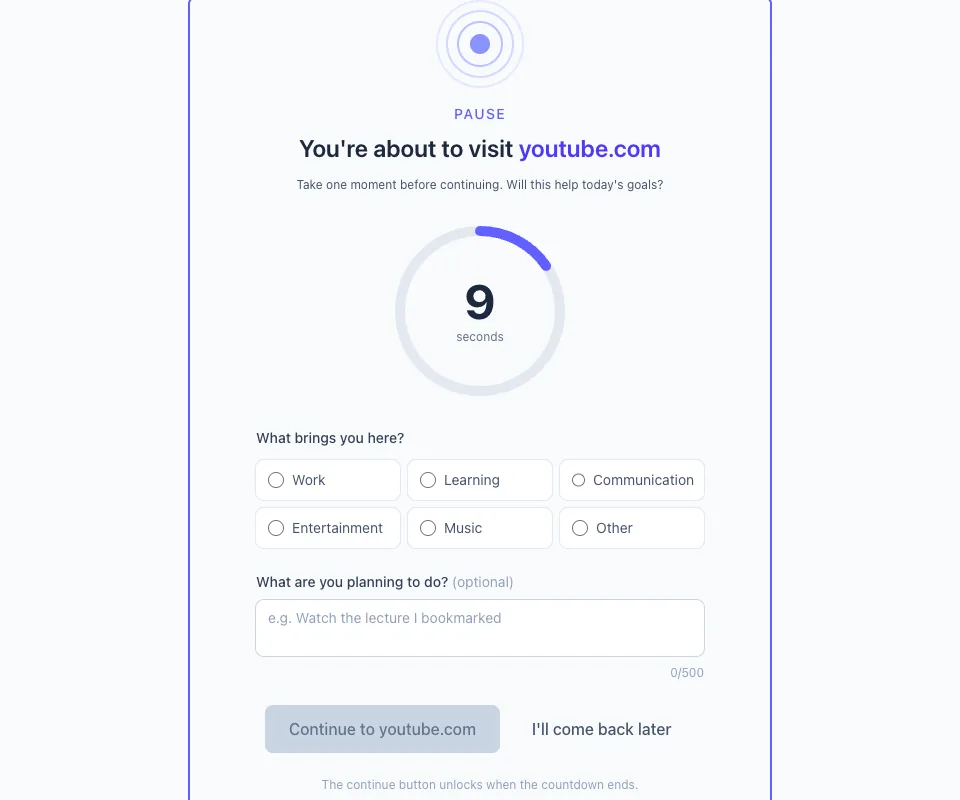
Next time you navigate to one, Chrome lands on a quiet pause page first: the domain you were heading for, a countdown ring, and a question about why you came. No red screen, no shaming, no score.
Choose, and mean it
Pick a reason, wait out the countdown and continue — or close the tab and get on with your day. Both buttons are real. The point was never to keep you off the site; it was to make sure you were the one who decided.
See the pattern build up
The popup shows today at a glance and the options page keeps thirty days: how often you paused, which sites, which reasons, and how often you walked away. It is the only record, it is yours, and it is deletable.
What it does
Built around one job: a pause, not a block
A free Chrome extension that shows a 10-second pause before distracting websites instead of blocking them. No account, no tracking, zero network requests.
A pause your reflex has to sit through
Open a site on your list and a quiet full-page interstitial appears with a circular countdown — ten seconds by default, anywhere from three to a hundred and twenty. "Continue" unlocks when the timer ends. "I’ll come back later" closes the tab immediately, and it is always the faster option.
A question instead of a lecture
Before you continue you pick why you are here — work, learning, communication, entertainment, music or other — and can jot down what you are planning to do. Naming the intent is what turns a reflex into a decision, and it is the whole mechanism.
Your own list, matched precisely
Add youtube.com and every subdomain is covered. Use *.reddit.com when you want the wildcard spelled out, or example.com/feed to protect one section of a site and leave the rest alone. Up to two hundred entries, edited in a plain text box.
Statistics only your browser sees
Pauses per site, how often you continued versus walked away, total time spent paused, which reasons you gave, and how much of the countdown you usually wait through. Thirty days of it, on your machine, exportable as JSON and erasable in one click.
A soft daily limit that never locks
Set a per-site daily visit count and, once you pass it, the pause simply doubles and one gentle notification appears. There is no wall at the end, no streak to break and no red warning screen — visiting a site is not a failure.
Zero network requests, by construction
No account, no sign-in, no analytics, no ads, no servers. Four permissions and no host permissions at all, which is why it cannot read or change the content of any page you visit — settings and statistics sit in your browser’s own storage and go nowhere else.
Screens
TemptShield, screen by screen
The pause: a countdown, a reason, and a way out
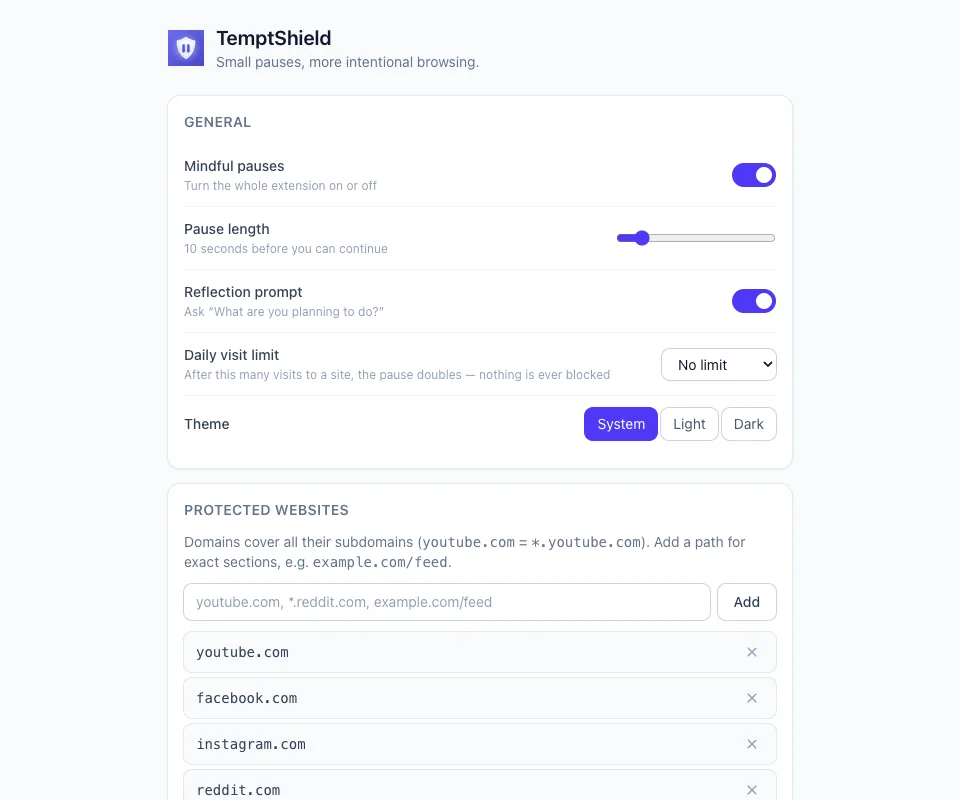
Settings: pause length, daily limit, protected sites
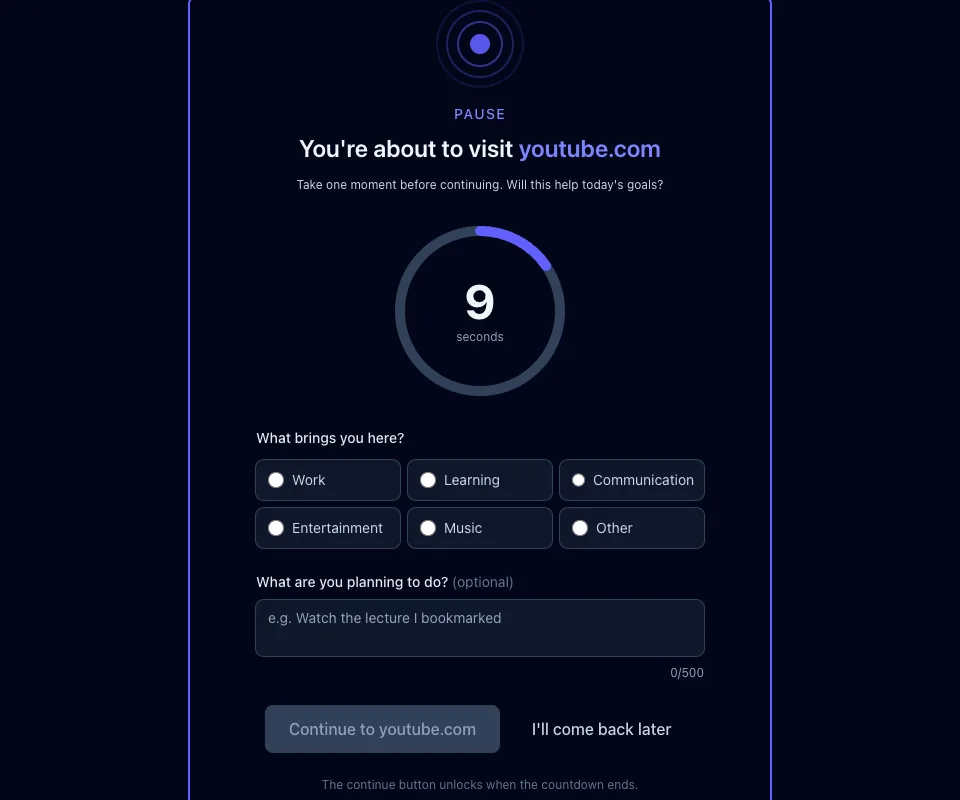
The same pause in dark mode
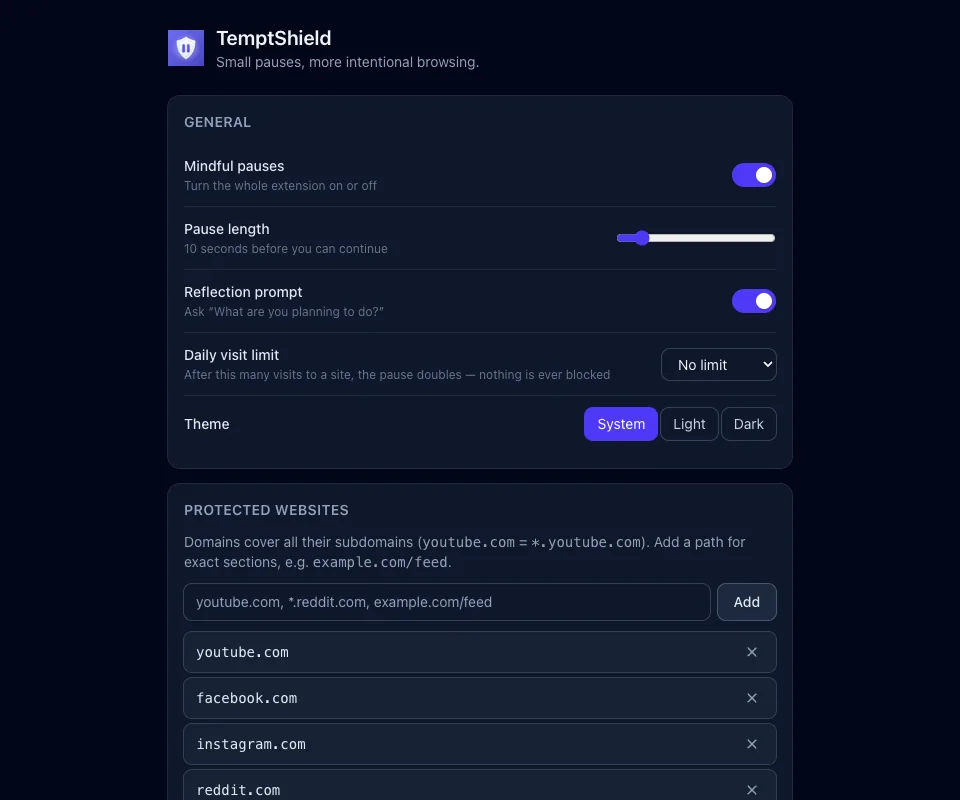
Light, dark, or whatever your system says
Privacy
Four permissions, no host permissions
TemptShield asks for the narrowest set of permissions that lets a pause appear at all, and requests no access to the pages you visit — so it cannot read or change what is on them, whatever it might promise.
| Permission | What it is used for |
|---|---|
| storage | Keeps your settings and your pause statistics in the browser’s own local storage, plus short-lived markers so the same tab is not interrupted twice in a row. |
| webNavigation | Notices when a top-level navigation is heading for a site on your list, so the pause can be shown first. Addresses are matched locally; anything not on your list is ignored and never recorded. |
| alarms | Runs the periodic housekeeping that deletes statistics older than thirty days and clears expired markers. |
| notifications | Shows one gentle heads-up when you reach a daily limit you set yourself. Nothing else is ever notified, and none of it appears if you have not set a limit. |
There are no host permissions and no content scripts, and the extension makes no network requests at all — there is no server to send anything to. Read the privacy policy or read the source.
Pricing
Free, and open source.
No paid version, no trial, no ads, no data to sell — and the entire source is public, so the claim that nothing leaves your browser is one you can check rather than take on faith.
- A pause your reflex has to sit through
- A question instead of a lecture
- Your own list, matched precisely
- Statistics only your browser sees
- A soft daily limit that never locks
- Zero network requests, by construction
On your phone too
The same idea, for Android apps
A browser pause does nothing about the phone in your pocket. TemptShield for Android applies the same friction to the apps you flag — a separate, free download that shares no data with this one.

Questions
Frequently asked
How is this different from a website blocker?
A blocker decides for you; this decides nothing. When you open a site on your list you get a countdown and a question, and at the end the Continue button works — every time, with no override code, no penalty and no lecture. That matters because blockers get uninstalled: the moment one stands between you and something you genuinely need, it becomes the enemy, and it loses. Friction never picks that fight. It just makes sure the visit is something you chose rather than something your fingers did.
What actually happens when I open a protected site?
The navigation is redirected to a local page inside the extension before the site loads. You see the domain you were heading to, a circular countdown, six reason buttons and an optional "What are you planning to do?" box. Choosing a reason and waiting out the countdown unlocks Continue; "I’ll come back later" closes the tab there and then. Once you continue, that tab is left alone for the next few minutes — five by default, adjustable up to sixty — so ordinary browsing does not turn into a series of interruptions.
Which websites can I put behind a pause?
Any of them, and the matching is deliberately flexible. A plain domain like youtube.com covers all of its subdomains; *.reddit.com is the same thing written explicitly; and a path prefix like example.com/feed protects one part of a site while leaving the rest untouched. The defaults are youtube.com, facebook.com, instagram.com, reddit.com and x.com, and every one of them can be removed.
Does it work in Microsoft Edge, Brave, Firefox or Safari?
No. It is built and published for Chrome, and needs Chrome 121 or newer. Nothing outside Chrome is tested or maintained today, so treat every other browser as unsupported.
Can it see my browsing history or what I do on a page?
No. The extension requests no host permissions and injects no content scripts, which is a technical guarantee rather than a promise: it has no way to read or change what is on a page. It is told about top-level navigations, compares the address to your own list locally, and records only the ones that matched. Everything else is discarded on the spot.
Where does my data go?
Nowhere. There are no network requests of any kind — no accounts, no sync, no analytics, no crash reporting, no ads. Your settings, your pause history and any reflections you typed live in your browser’s local storage, are pruned automatically after thirty days, and can be exported as JSON or deleted outright from the settings page. Uninstalling removes all of it.
What if I need to browse without interruptions?
Turn the whole thing off from the toolbar popup — one click, no confirmation, no guilt trip, and back on the same way. A tool for building intention that makes it hard to stop using it would be arguing with its own point.
Is there a phone version?
For Android, yes — the same idea applies to apps rather than tabs. TemptShield for Android shows a full-screen pause over the apps you flag and keeps a private count of the urges you resisted. It is a separate, free download, and the two do not talk to each other or share any data.
Is it really free?
Yes. Every feature, no advertising, no upsell, nothing to buy. The code is public on GitHub if you would rather read it than trust it.
Put one site behind a pause
Free, no account, and nothing you do in Chrome leaves your browser.