
TemptShield
Friction, not surveillance.
Ten seconds between the urge and the app.
Porn and doomscrolling are not decisions — they are reflexes. TemptShield puts a full-screen pause in front of the apps you have flagged, long enough for the decision to come back to you, and counts every urge you beat. Fully offline: no account, no filter list to upload, nobody watching.
Android · Free · No ads, no account
- A 10-second pause before porn and doomscroll apps open
- Device-wide adult-content filtering via Android Private DNS
- An urge score only you can see
- Free, offline, no account, no tracking
What it does
Built around one job: friction, not surveillance
TemptShield helps you quit porn and phone addiction on Android: a 10-second pause before tempting apps open, an honest urge score, and offline privacy.
A pause your reflex cannot beat
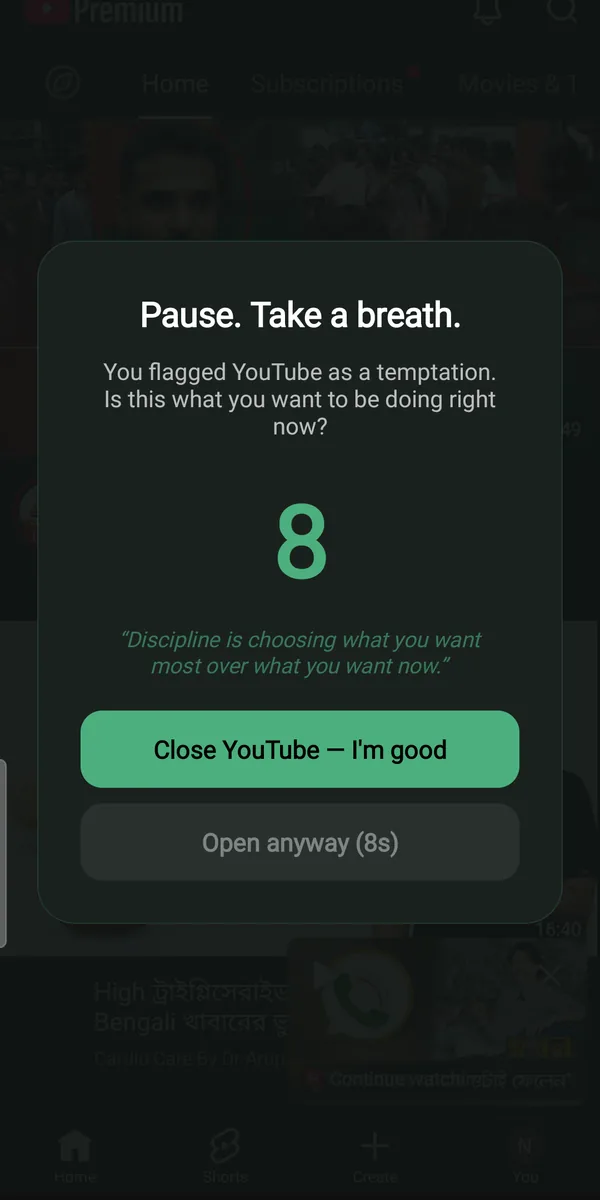
Open a flagged app and a full-screen countdown appears over it. "Close it" works instantly; "Open anyway" stays locked until the timer runs out. Ten seconds is longer than an urge is honest.
Adult content filtered at the network level
TemptShield walks you through switching Android’s own Private DNS to Cloudflare Family, which filters adult sites for every app and browser on the device. Cloudflare does the filtering — TemptShield shows a green shield while it is on, and a red card the moment it is switched off or changed.
An honest score, only you can see
Every attempt is recorded as tackled or opened anyway — today, this week, this month, with a "% resisted" figure and a day-by-day breakdown. Watching the tackled number climb is what makes the habit visible.
Tighten the friction as you go
Set the wait from 3 to 60 seconds and the "Open anyway" pass from 1 to 60 minutes. Start gentle while the habit is raw, then make slipping steadily more expensive.
It never sees what you do
TemptShield notices only which flagged app came to the front. No browsing history, no URLs, no message contents, no screenshots, no keystrokes — there is nothing recorded that could ever embarrass you.
No account, no servers, no report to anyone
Everything lives in local storage on your phone. There are no ads, no trackers and no analytics, and uninstalling deletes it all — a reinstall honestly starts back at zero.
Screens
TemptShield, screen by screen
The pause that buys back the decision
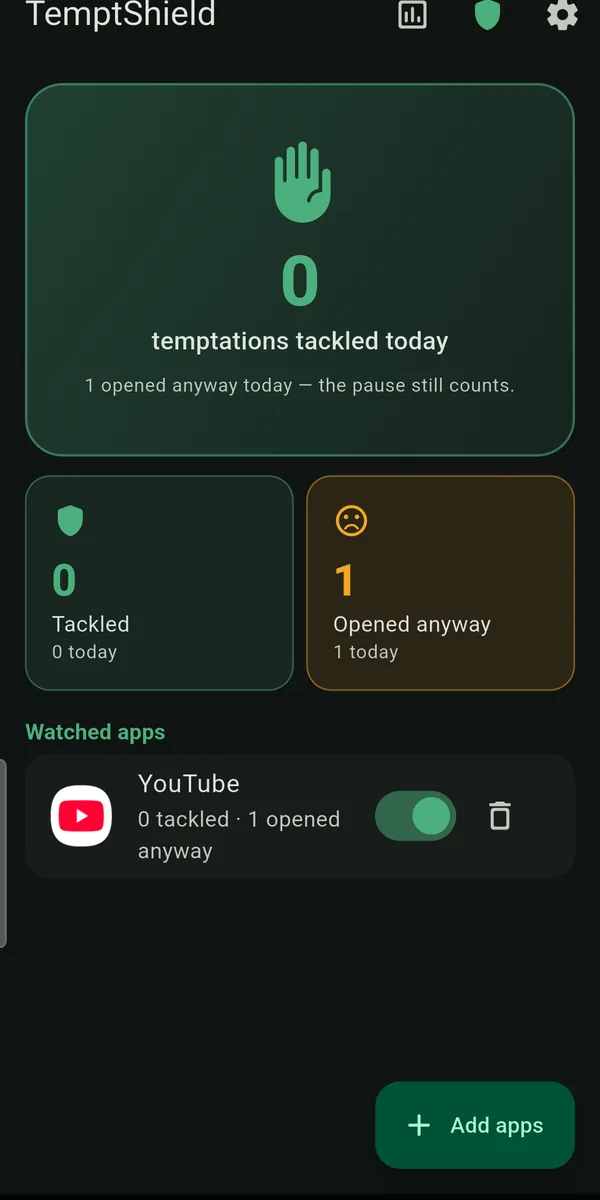
Your watched apps and today’s score
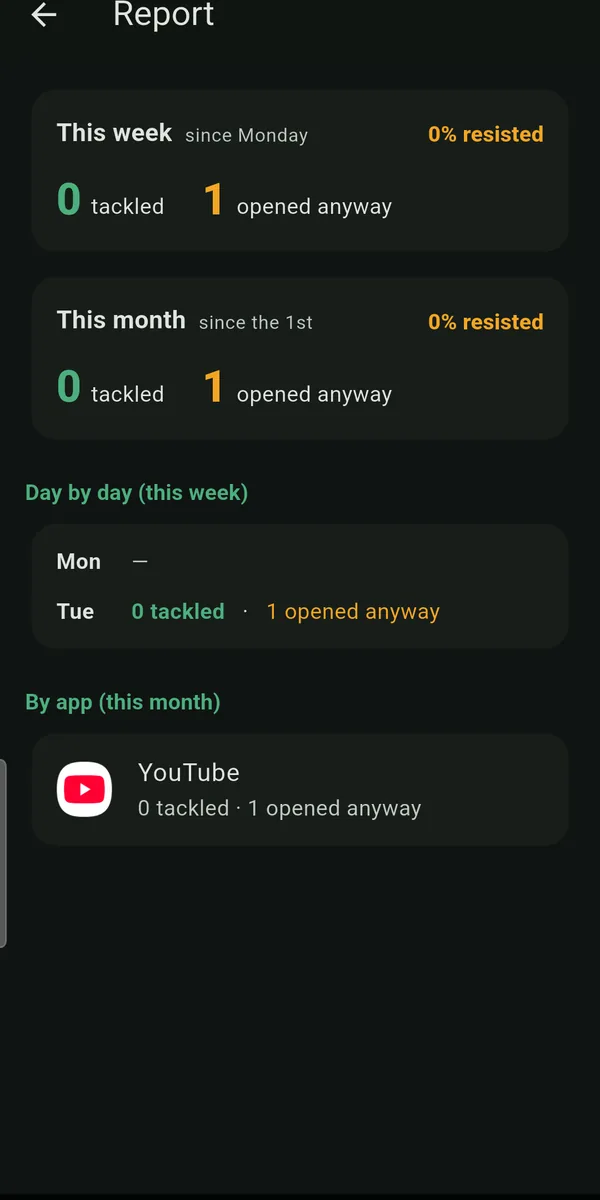
The pattern, week by week
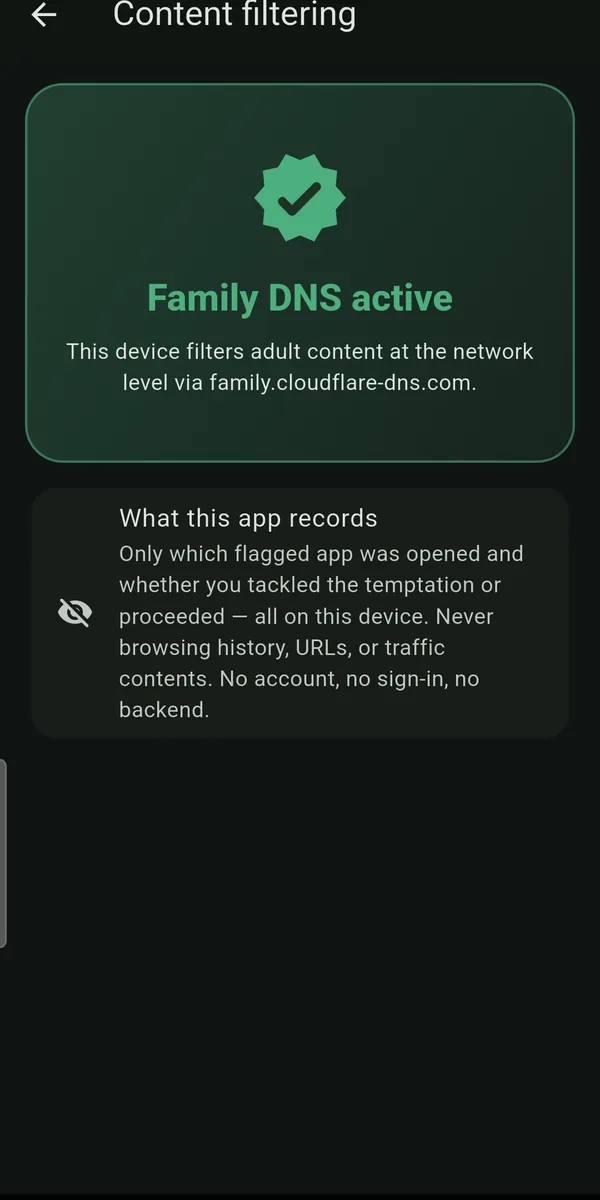
Know your DNS filter is still on
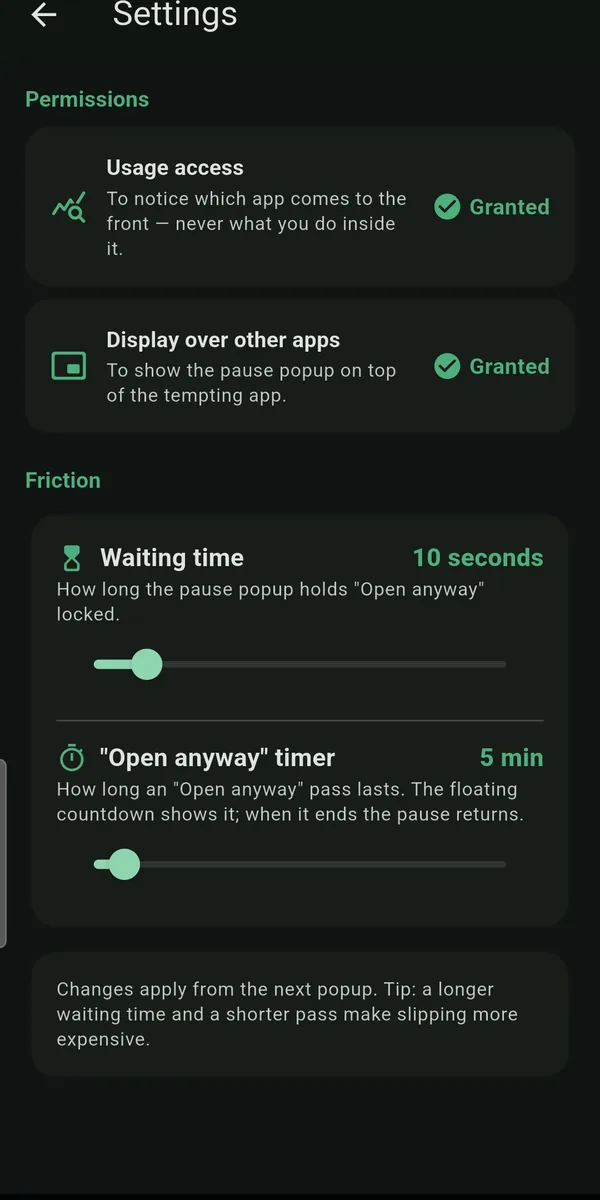
Dial the friction up over time
Pricing
Free. All of it.
TemptShield has no paid tier, no subscription, no ads and no trackers. Recovery tools that charge you at your lowest moment are their own kind of trap.
- A pause your reflex cannot beat
- Adult content filtered at the network level
- An honest score, only you can see
- Tighten the friction as you go
- It never sees what you do
- No account, no servers, no report to anyone
Questions
Frequently asked
Can TemptShield help me quit porn?
That is what it is built for. It works on the two places the habit actually lives: the reflex — a full-screen pause in front of the apps and browsers you flag, so an urge has to survive ten seconds of waiting — and the supply, by walking you through Android’s Private DNS setting so that adult sites are filtered device-wide. It is a self-control tool, not treatment; if the habit is costing you your work, your relationships or your sleep, a therapist is worth more than any app.
Does TemptShield block adult websites itself?
No, and it is important to be exact about this. The filtering is done by Android’s own Private DNS setting and the resolver you point it at — TemptShield suggests Cloudflare Family (family.cloudflare-dns.com) and takes you straight to the Android screen where you turn it on. What TemptShield adds is vigilance: it reads that setting continuously and shows a red warning card the moment the filter is switched off or changed, which is exactly when a relapse would otherwise go unnoticed.
What stops me from just tapping "Open anyway"?
Nothing, and that is deliberate. TemptShield never locks you out or takes the decision away — it only makes the decision cost ten seconds of your attention instead of none. Hard blockers get uninstalled in a week precisely because they pick a fight with you; friction keeps you in charge and simply makes the impulsive path the slower one.
Will it work on browsers and social apps too?
Yes. You choose which installed apps to flag, so Chrome, a social feed, a game or a video app all work the same way — anything that pulls you in when you are tired. Each one can be toggled on or off without removing it from the list.
Which permissions does it need, and why?
Two, and the app does nothing without them. Usage access lets it notice which app has come to the foreground so the pause can appear; display over other apps lets it draw the pause on top. It reads only the identity of the app in front — never what you do inside it. Both are granted from banners on the home screen and can be revoked in Android settings at any time.
Does anyone else see my activity?
No. There is no account, no server and no accountability-partner report, because there is nobody to send one to. Your flagged apps and counters sit in local storage on your device, and Android’s auto-backup is deliberately disabled so they are never uploaded.
Is it really free?
Yes — every feature, with no ads, no subscription and no in-app purchase of any kind.
Is there an iPhone version?
No — TemptShield is Android only. Noticing which app came to the foreground and drawing a pause over it are things iOS does not let an app do.