How to remind yourself to call someone back on Android
"I'll call them tomorrow" is not a plan, and your phone has nowhere sensible to put it. Here are the ways Android can hold a call reminder, what each one loses, and how to keep the reminder attached to the person.
Someone rings while you are driving. You look at the screen, decide it can wait, and think: I'll call them tomorrow.
You will not call them tomorrow. You will remember on Thursday, at a moment when calling is impossible, and the thought will go round again.
This is not a memory problem. It is a storage problem. The intention — call this person, at roughly this time — has no obvious place to live on an Android phone, so it lives in your head, where it gets one chance to resurface and then decays.
Here is where it can actually live.
The options Android gives you
The missed-call list. This is what most people rely on, and it is the worst of the options. It is a log, not a queue: nothing distinguishes a call you dealt with from one you meant to return, and the entry drops off the visible list after a few days of ordinary phone use. It records that something happened, not that you owe someone something.
A calendar event. Reliable, and it will genuinely alert you. But a calendar entry is a block of time, and "call Rafiq" is not a block of time — it is a two-minute task that can happen anywhere in a three-hour window. Filling your calendar with 10-minute pseudo-meetings makes the calendar less useful for the thing calendars are good at. And the event holds a name, not a contact: when it fires you still have to go and find the person.
Google Tasks or Keep. Closer. A task with a due date and a reminder does the job for the reminding part. What it loses is the phone number. You get a notification that says "call Rafiq", tap it, land in a notes app, then go to the dialler and search. Three steps and a context switch, at exactly the moment your motivation to make the call is lowest.
"Hey Google, remind me to call Mum at six." The fastest way to capture one, and worth using for that alone. It lands in Google's reminders, which means the same disconnect as above — a text string, not a person — plus the reminder now lives in a different app from your contacts.
An alarm. People genuinely do this, and it works for exactly one reminder at a time. Two or three and you have no idea which alarm is which.
Notice the pattern. Every native option can store the when. None of them stores the when next to the who, so every one of them ends with you doing a lookup you should not have had to do.
Why the contact list is the right place for it
The thing you want to be reminded about is a person, and you already have a list of people with their numbers in it. The reminder belongs there — not in a notes app that has never heard of Rafiq.
Storing it against the contact gets you three things for free:
- The number is already attached, so acting on the reminder is one tap rather than a search.
- The reminder can clear itself when you make the call, because the thing that fulfils it is the call itself.
- Everything you owe a call to is one list, sorted by when it is due, instead of scattered across three apps.
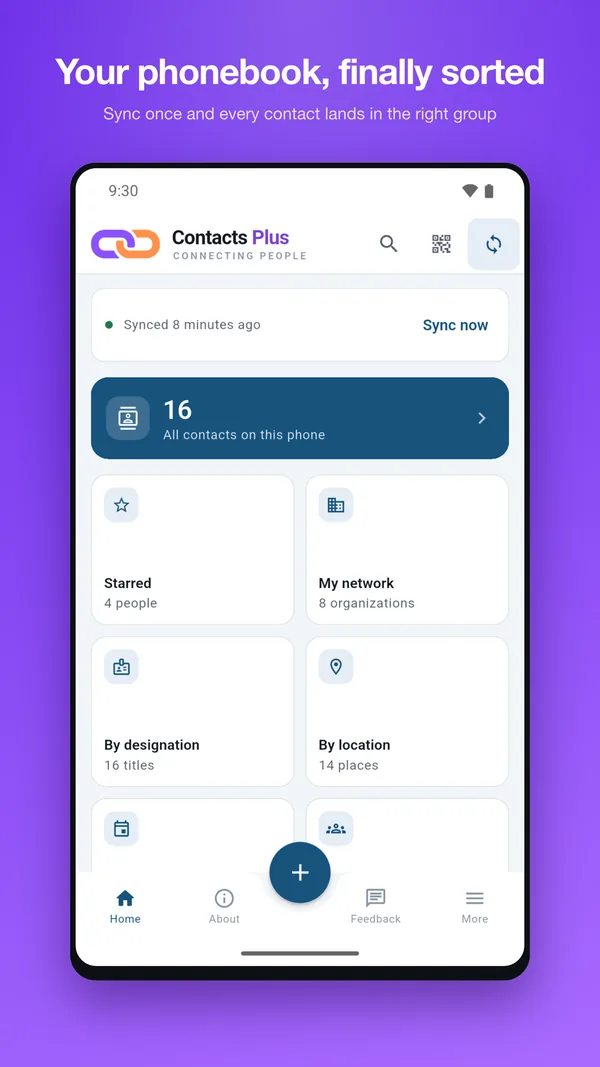
Doing it in Contacts Plus
Contacts Plus is built around that idea — it reads the contacts already on your device and gives you different ways to work with them. Call reminders are one of those ways, and they are free.
Setting one. Open a contact and tap Remind to Call. You get four one-tap answers to "when?" — in an hour, this evening, tomorrow 9 AM, next week — and a date and time picker underneath for anything else. Those four cover most reminders anyone actually sets, which is the point: a reminder you spend forty seconds configuring is a reminder you stop setting.
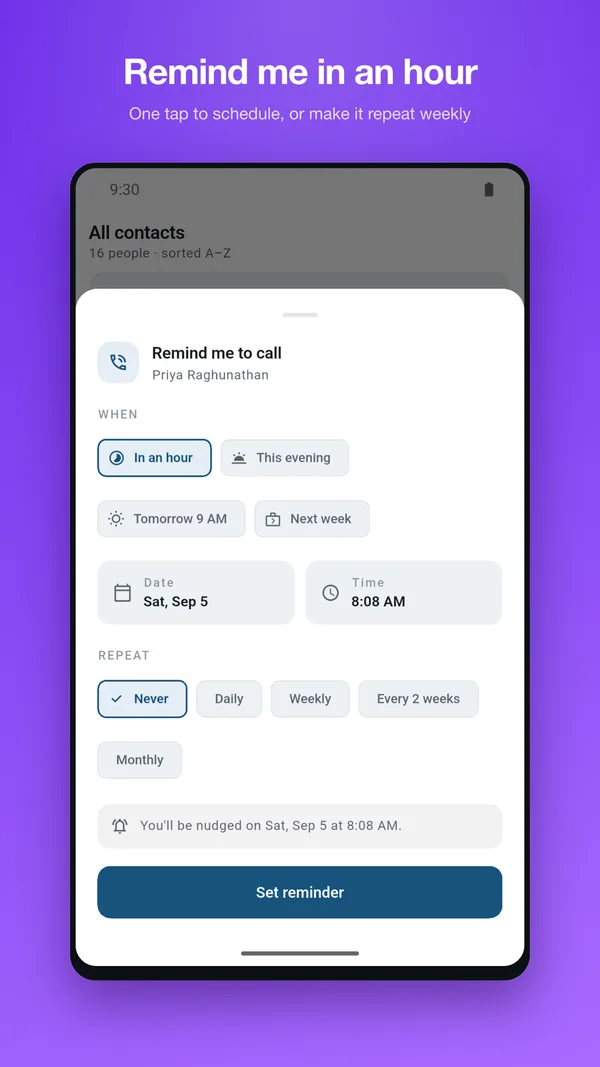
Making it repeat. The same sheet offers a repeat: daily, weekly, every two weeks, or monthly. This is the setting worth understanding, because it changes what the feature is for. A one-off reminder is admin — return this call. A repeating one is a relationship: the parent you mean to ring every Sunday, the old colleague you say you should catch up with and never do. Set it once and it keeps coming back.
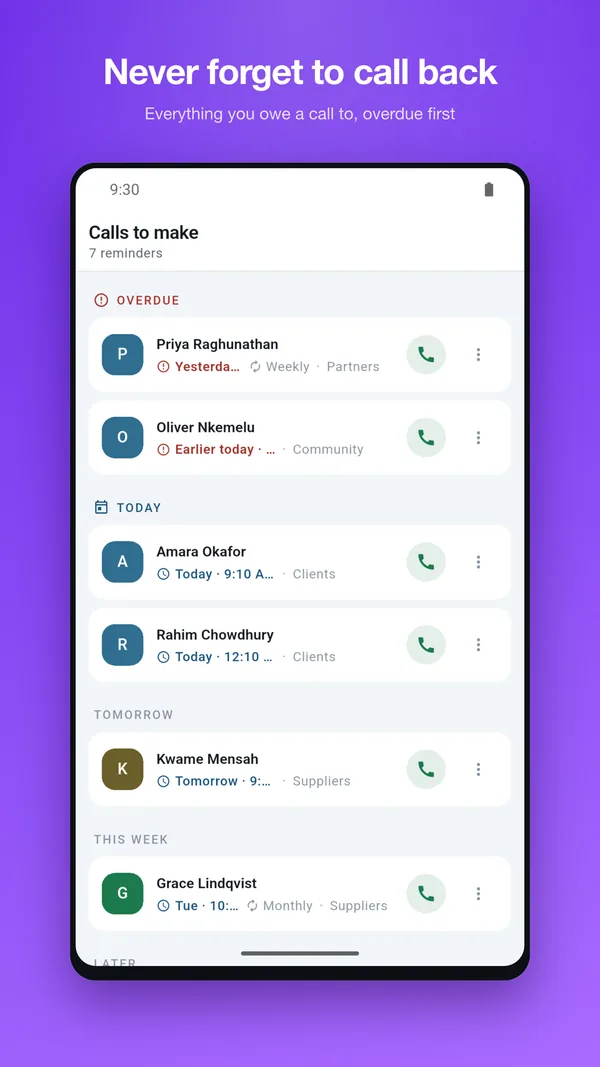
When it fires. Your phone shows a notification for that person. Tapping it opens Calls to make, the list of everything you owe a call to, grouped as overdue, today, tomorrow, this week and later — so what you have let slip is at the top, where it is uncomfortable, which is the correct place for it.
Acting on it. Every row has a call button. Tapping it opens your dialler with the number filled in, and clears the reminder on the way — a one-off disappears, a repeating one rolls forward to its next turn. If now is genuinely not the moment there is snooze for an hour or until tomorrow, a done if you sorted it another way, and a reschedule if the whole plan has changed.
The reminders are scheduled locally on your device, in your own time zone. Nothing about who you plan to call is sent anywhere.
Two practical notes
Grant the notification permission. On Android 13 and later, notifications are off until you allow them. A reminder that cannot notify you is just a database row.
Check battery optimization if reminders arrive late. Aggressive power management on some manufacturers' phones will delay background alerts. If reminders are consistently arriving well after their time, allow Contacts Plus to run unrestricted in your battery settings.
The habit that makes it work
The temptation is to reserve this for important calls. Do the opposite: use it for the trivial ones, the moment you decide not to answer.
The value is not in the reminding. It is in getting the intention out of your head immediately, while you still have it, so that "I'll call them tomorrow" stops being a thing you tell yourself and becomes a thing your phone is holding.
Then tomorrow, the list tells you who you said that about.