How to stop opening YouTube out of habit
You did not decide to open that tab — your fingers did. Here is why the reflex is so hard to catch, what does not work about blocking it, and the two-second change that does.
Cmd+T. Three letters. Enter.
By the time you notice, the homepage is loading and a thumbnail has already caught your eye. You did not sit down and decide to watch anything. There was a gap — a compile, a hard paragraph, a moment of being tired — and your hands filled it before the rest of you was consulted.
That is the thing worth being precise about, because it changes what actually fixes it. This is not a willpower problem. Nobody is losing an argument with themselves at that moment; there is no argument. There is a cue, a trained sequence of keystrokes, and a reward, and the whole thing runs start to finish in under two seconds.
Why the reflex is so fast
Habits get automatic on purpose. Anything you repeat enough gets handed down from the deliberate part of your brain to a much older, much faster part that runs patterns without consulting anyone. That is a good deal for tying your shoes. It is a bad deal for a URL bar that autocompletes after one letter.
Three things make the browser version of this unusually sticky:
- The cue is invisible. For most people it is not boredom, it is transition. Finishing something. Getting stuck. The half second after closing a window. You cannot avoid a trigger you never notice firing.
- The action is nearly free. Three keystrokes. There is no friction anywhere in the sequence to give the deliberate part of your brain a chance to catch up.
- The reward is variable. Sometimes the feed is dull, sometimes it is perfect. Unpredictable rewards produce far stickier habits than reliable ones — this is the same mechanism that makes slot machines work.
So the question is not "how do I want it less?" You will still want it. The question is: how do I get the decision back?
What most people try first, and why it fades
Blocking the site. This works for about a week. Then a day comes when you genuinely need to look something up on YouTube, and the blocker becomes the enemy rather than the plan. You disable it "just for now", and now-forever begins. Any tool that stands between you and something legitimate will eventually lose, because you are the one holding the uninstall button.
Logging out, hiding bookmarks, clearing history. Real friction, and worth doing. But autocomplete relearns your habit in a day.
A timer or a screen-time budget. These measure the problem accurately and change it barely at all. A number at the end of the week does nothing at the moment the reflex fires, which is the only moment that matters.
Willpower. Asking the slow, deliberate part of your brain to beat the fast, automatic part at its own game, on a day when you are tired. It loses roughly as often as you are tired.
Notice what all four have in common: none of them intervenes in the two seconds where the decision actually happens.
The change that works: put a gap in the sequence
Habit research is unusually consistent about this. If you want to interrupt an automatic behaviour, the most reliable lever is not motivation or punishment — it is friction, applied to the specific action, at the exact moment it fires.
You do not need much. Ten seconds is plenty. An urge is a wave, not a constant, and it is at its least honest in the first few seconds. Make the automatic path take ten seconds of conscious waiting and two things happen at once:
- The reflex cannot complete. The sequence that used to run to the end without you now has a gap in it that only you can cross.
- The rest of your brain catches up and asks the obvious question: do I actually want this right now?
Half the time the answer is yes. You wanted to look something up, or you have finished work and a video is exactly the right call. That is a perfectly good answer, and any tool that makes you feel bad about it is going to get uninstalled just like the blocker did.
The other half, the answer is no — and you close the tab, not because something stopped you, but because you noticed you never chose it.
Doing it in Chrome
This is what TemptShield for Chrome is: a pause, not a wall. You list the sites you want to be deliberate about, and when you navigate to one, Chrome shows a quiet page first — the domain you were heading for, a countdown, and a question about why you came.
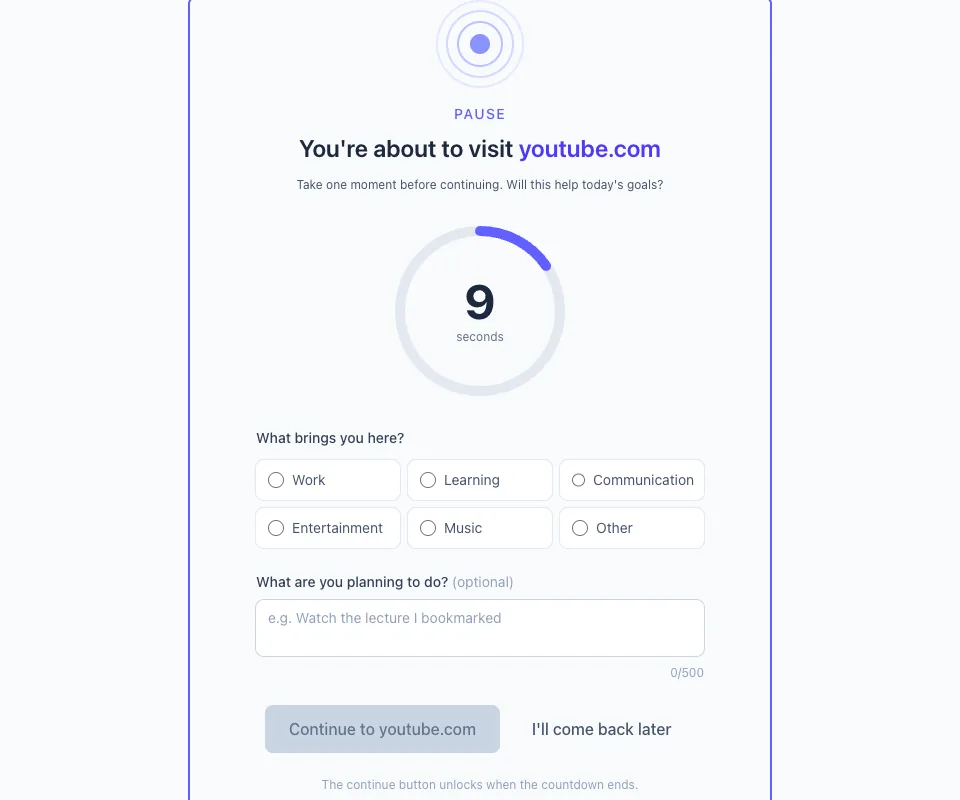
Two details matter more than they look:
The Continue button always works. When the countdown ends, it unlocks. Every time, with no override code and no penalty. That is not a weakness in the design — it is the design. The moment a tool can genuinely stop you, you start fighting it, and eventually you win and it is gone.
You have to name a reason. Work, learning, communication, entertainment, music, other. It takes one click, and it is doing most of the work: the reflex has no answer to "why am I here?", so answering at all pulls the visit back into the deliberate part of your brain. There is an optional box for what you are planning to do, which is even better when you use it.
Then it counts. Not for anyone else — there is no account, no server and nothing sent anywhere — but for you: how often you paused, on which sites, and how often you closed the tab instead.
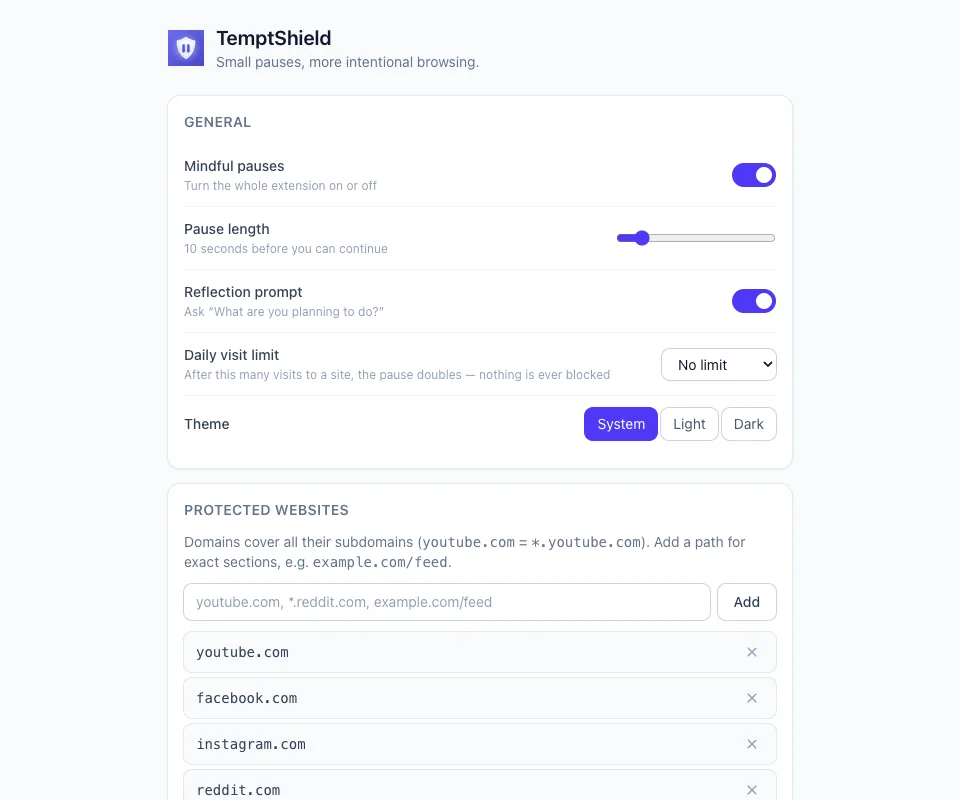
How to actually set this up
Start with one site. Not five. The one you open without deciding to — you already know which it is. Adding your whole browsing history on day one is how this becomes something you switch off on Thursday.
Ten seconds, not sixty. A pause you resent is a pause you will remove. Ten seconds is long enough to interrupt the sequence and short enough that you never dread it. Turn it up later if it starts feeling like nothing.
Actually read the question. The countdown does very little on its own. Answering why am I here is what converts a reflex into a decision, so give it the one second of attention it asks for.
Treat "continue" as a win too. You came to be intentional, not abstinent. A visit you chose on purpose is exactly what success looks like — the score to watch is not how few times you continued, but how few times you arrived somewhere without noticing.
Let a week go by before judging it. The first two days are strange, the reflex fires and hits the pause and you feel slightly foolish. By the end of the week you will notice something better: you start catching yourself before the pause appears, at the keyboard, with your hands halfway to a new tab.
That is the actual goal. The pause is a set of training wheels for a decision you are learning to make one moment earlier.
If the habit is on your phone too
It usually is, and a browser extension does nothing about the device in your pocket. TemptShield for Android applies the same idea to apps: a full-screen pause over the ones you flag, a private count of the urges you got past, and nothing leaving the phone. It is free, and the two are entirely separate — installing one has no bearing on the other.